
$
$
Product successfully added to your shopping cart.
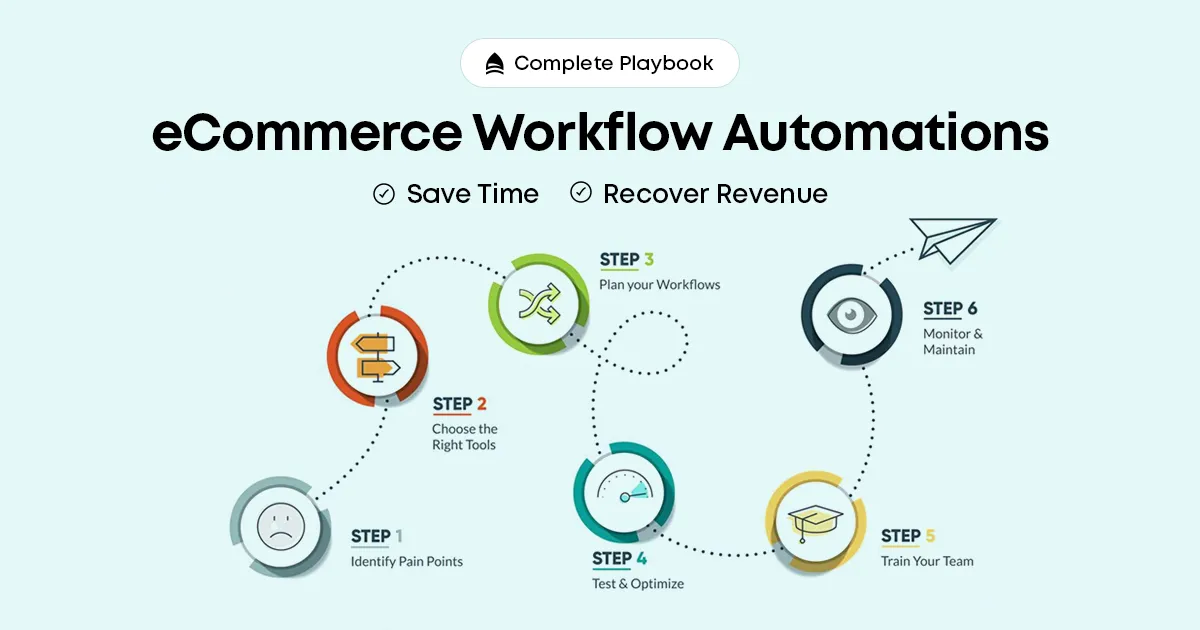
Every ecommerce store owner knows the feeling: you launched with energy and excitement, and now half your day is consumed by tasks identical to yesterday — updating inventory, sending confirmation emails, moving data between systems. These tasks are necessary, but none of them grow your business. Workflow automation removes you from repetitive operations by setting up systems that handle them automatically. When a trigger fires, the workflow runs without any human intervention.
Every order should trigger an immediate confirmation email with order details, followed by a shipping notification with tracking when fulfilled. Automate delivery confirmations, proactive delay notifications when fulfilment takes longer than expected, and post-delivery check-in messages requesting a review. Zero manual effort required.
Set up automated rules to flag orders matching fraud patterns: billing and shipping address mismatches, high-value orders from new customers using prepaid cards, multiple orders to the same address with different payment methods. Automate the flagging — not the rejection — to put suspicious orders in a review queue without blocking legitimate sales.
For B2B stores or stores offering net payment terms, automated invoice generation and payment reminder sequences eliminate manual chasing. Sequence: invoice on order → reminder at 3 days → firm reminder at 7 days → escalation at 14 days.
Set minimum stock thresholds for every product. When inventory hits the threshold: trigger a purchase order to your supplier, send an internal alert to your buying team, and optionally add a "Low Stock" badge to the product page to create urgency. Never run out of top sellers because no one noticed the stock getting low.
When a product goes out of stock, automatically switch it to a waitlist mode. Capture emails from interested customers. When stock arrives, automatically notify the waitlist in order — capturing demand you would otherwise have lost permanently.
If you sell on your own store and on marketplaces simultaneously, automated inventory sync is essential. Every sale on any channel should instantly update inventory across all channels. Without this, overselling is inevitable — and the customer experience damage from unfulfillable orders is severe.
The most impactful marketing automation in ecommerce. Email 1 at 1 hour (friendly reminder), Email 2 at 24 hours (reinforce product benefits), Email 3 at 72 hours (time-limited incentive if appropriate). Well-configured cart recovery sequences recover 5–15% of abandoned carts — essentially free revenue from traffic you have already paid for.
A new email subscriber is your most engaged audience segment — they just opted in. Automate a 3–5 email welcome series: brand story and values, your bestsellers, social proof and reviews, a first-purchase incentive, and an invitation to follow your social channels. Welcome series convert subscribers to customers at rates 3–4x higher than standard broadcast emails.
Seven to ten days after delivery, automatically request a review with a personalised one-click link. Layer in a complementary product recommendation: a customer who bought a camera bag may be ready to buy a tripod two weeks later. Automate that suggestion as a personalised "pairs well with your recent purchase" message.
Segment customers who have not purchased in 90, 180, or 365 days. Trigger automated win-back sequences tailored to the lapse duration: a simple "We miss you" at 90 days, a meaningful incentive at 180 days, and a last-chance re-engagement at 365 days before suppressing to protect email deliverability.
"Where is my order?" is the single most common ecommerce support query. Connect your chatbot to your order management system so it can pull real-time tracking and respond instantly, 24/7, without a human agent. The same applies to return policy queries, product availability, and sizing information.
Set up rules to automatically route incoming support tickets to the right team member based on topic, order value, or customer lifetime value. Prioritise tickets from high-value customers or those containing escalation keywords. Automate first-response acknowledgements so customers know their query has been received.
Connect your ecommerce platform to QuickBooks, Xero, Zoho Books, or Tally so every sale, refund, and fee is automatically recorded. Eliminate manual data entry, reduce reconciliation errors, and keep financial reporting always current.
For Indian stores, automated GST reporting saves significant time at each filing period. Configure your store to tag every transaction with the correct tax code and automate monthly summary reports that feed directly into your CA or filing system.
For Shopify stores: Shopify Flow handles native workflow automation, Klaviyo for email and SMS. For WooCommerce: AutomateWoo and Uncanny Automator handle most workflow needs. For multi-channel operations: Linnworks or Brightpearl centralise order and inventory management. Zapier connects systems that do not natively integrate across all platforms.
Do not try to automate everything at once. Prioritise by impact: abandoned cart recovery, order confirmation and tracking, low stock alerts, and review request sequences deliver the highest ROI for the lowest implementation effort. Get those running first, then build outward.
Every hour spent on automation setup is bought back many times over in operational hours saved and revenue recovered. The businesses that scale efficiently are not working harder than their competitors — they have built systems that work while they sleep. Start with the highest-impact workflows, validate the results, and expand from there.
ecommerce automation, ecommerce workflow automation, automate online store, ecommerce order automation, inventory automation ecommerce, abandoned cart automation, ecommerce marketing automation, shopify automation, woocommerce automation